
The Memory Fix That Stopped My AI Agent From Starting Over Every Week
How Hindsight + Hermes Agent gave my setup actual long-term memory.
The takeaway: Most AI agent memory is a Post-it note pretending to be a brain. Mine was capped at 2,200 characters and I was hitting that ceiling within a week of using Hermes. The fix wasn’t a bigger note. It was a different retrieval model entirely: store everything, but only pull in what’s relevant to this conversation. Here’s exactly how I set that up, what broke along the way, and whether it’s worth your hour.
The Monday morning I got tired of repeating myself
Every Monday, same ritual: open my AI assistant, re-explain the setup, skills, keys, the projects I was juggling, the preferences I’d already explained four times. Not because the agent was broken, it did exactly what I asked, every time. It just couldn’t remember what I’d asked before.
If you’ve spent any real time with AI agents, coding copilots, research tools, personal assistants, you know this feeling.
You pour context in, the session ends, and it evaporates. You’re back at zero, typing “I prefer concise responses” for the fifteenth time.
I assumed the agent was the problem. It wasn’t. The memory architecture was.
Why the 2,200-character ceiling is the wrong problem to solve
Most agent frameworks handle memory the same lazy way: stuff a fixed-size text block into the system prompt and hope it covers everything. Mine gave me 2,200 characters for general memory, 1,375 for my user profile. Sounds generous until you try to fit:
- dev environment + API provider fallback chains
- project-specific conventions
- workflow preferences and corrections I’d already made once
- tool quirks I’d debugged the hard way
- whatever project I’m currently mid-stream on
I was at 90% capacity in a week. By week two I was deleting hard-won lessons to make room for active context — a knowledge base running on a sticky note.
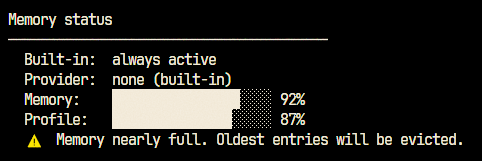
Here’s what took me longer than it should have to realize: the limit wasn’t the bug. The bug was that every memory got loaded into every conversation, whether it mattered or not. Mention “Docker” once, and the system drags in your entire memory block — including the unrelated stuff about your Obsidian vault and your podcast queue. You’re paying tokens and attention for context you didn’t ask for.
What I actually needed was a librarian, not a backpack. Something that does semantic retrieval — pull only what’s relevant, leave the rest stored until needed. That’s what sent me looking at Hindsight, an open-source memory layer for agents.
How it actually works
Hindsight skips the “dump everything in the prompt” model. It stores memories in a vector database (pgvector, riding on Postgres you probably already run) and retrieves only what’s relevant at query time. A dedicated LLM does the unglamorous work of reading your conversations and extracting structured facts automatically — you stop hand-curating a memory file like it’s a junk drawer.
graph LR
    A[Conversation] --> B[Hindsight API]
    B --> C[Fact Extraction LLM]
    C --> D[Vector DB<br/>pgvector]
    D --> E[Semantic Search]
    E --> F[Relevant Memories]
    F --> G[Injected into Prompt]
Setting it up: ~1 hour, including two avoidable mistakes
1. Deploy Hindsight alongside your existing Postgres.
hindsight:
  image: ghcr.io/vectorize-io/hindsight:latest
  ports:
    - "127.0.0.1:8888:8888"
    - "127.0.0.1:9999:9999"
  environment:
    HINDSIGHT_API_LLM_BASE_URL: https://your-llm-endpoint/v1
    HINDSIGHT_API_LLM_MODEL: your-model-name
    HINDSIGHT_API_LLM_API_KEY: your-key
    HINDSIGHT_API_VECTOR_EXTENSION: pgvector
Mistake #1 I made: Hindsight runs its own LLM for fact extraction — a separate config surface from your agent’s main LLM. I lost 20 minutes assuming a shared key before realizing these are two different doors.
Mistake #2: bind to 127.0.0.1, not 0.0.0.0. I didn’t need a new open port on the public internet, and neither do you.
2. Create a memory bank.
curl -X POST "http://localhost:8888/v1/banks" \
  -H "Content-Type: application/json" \
  -d '{"name": "hermes", "description": "Main agent memory bank"}'
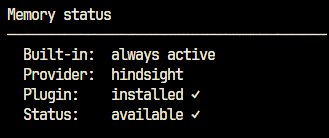
3. Point your agent at it. In my case, that meant flipping one line in the agent config from empty to provider: hindsight, then restarting the gateway and confirming the connection came back available ✓.
4. Migrate what you’ve already got — selectively. Old memories don’t transfer automatically. If I’m honest, I should’ve skipped this step almost entirely (more on that below) rather than carefully porting over a memory file I was about to make obsolete.
What actually changed, day to day
This is the part that’s easy to undersell: the difference isn’t dramatic, it’s targeted.
Before, every session opened with the same 2,200-character dump, relevant or not, every single time. Token cost was flat and high regardless of what I was actually working on.
After, mentioning “Hindsight setup” pulls in the Docker config and the exact debugging session where I fixed the API key mismatch. Mentioning my Obsidian vault pulls in that context instead — the path, the conventions, nothing else. Same underlying knowledge base, completely different prompt depending on what I’m actually doing.
The compounding effect: I stopped budgeting my own memories. I stopped triaging what was “important enough” to keep. The system just keeps everything and finds what’s relevant — which, it turns out, is the actual job a memory system should be doing.
The part I won’t pretend is free
- One more container to babysit — updates, monitoring, backups are now your problem.
- A few hundred milliseconds of latency per query for the vector search.
- Two LLM bills now, not one — your agent’s model, and a separate one running fact extraction on every conversation.
- A genuine single point of failure — if Hindsight goes down and you haven’t backed up the pgvector store, you lose everything it’s learned.
For me, the trade is worth it. But don’t adopt this because it’s trendy — adopt it because you’ve actually hit the wall I hit.
What I’d tell myself before starting
- Set up Hindsight before you fill your old memory system, not after. I spent real time migrating entries I should’ve just let go of.
- Use a smaller, cheaper model for fact extraction. It doesn’t need your flagship model’s reasoning — it needs to read a transcript and pull out facts.
deepseek-v4-flashworks, but I’d test cheaper still. - Watch the extraction logs from day one. Mine failed silently for hours before I noticed nothing was actually being stored.
- Back up the vector DB like you mean it. A daily cron dump took five minutes to set up and is the only thing standing between you and starting from zero again.
Bottom line: if you’re hitting a character ceiling with your agent’s memory, the ceiling isn’t the real problem — relevance is. Vector-based retrieval with automatic fact extraction means you stop choosing what to forget.
The setup costs you an hour and one more container to maintain. The payoff is an agent that stops asking you to re-explain yourself all the time..