
Moxa Atlas
An offline Android reference for exploring traditional point uses, understanding locations and saving useful references.
Overview
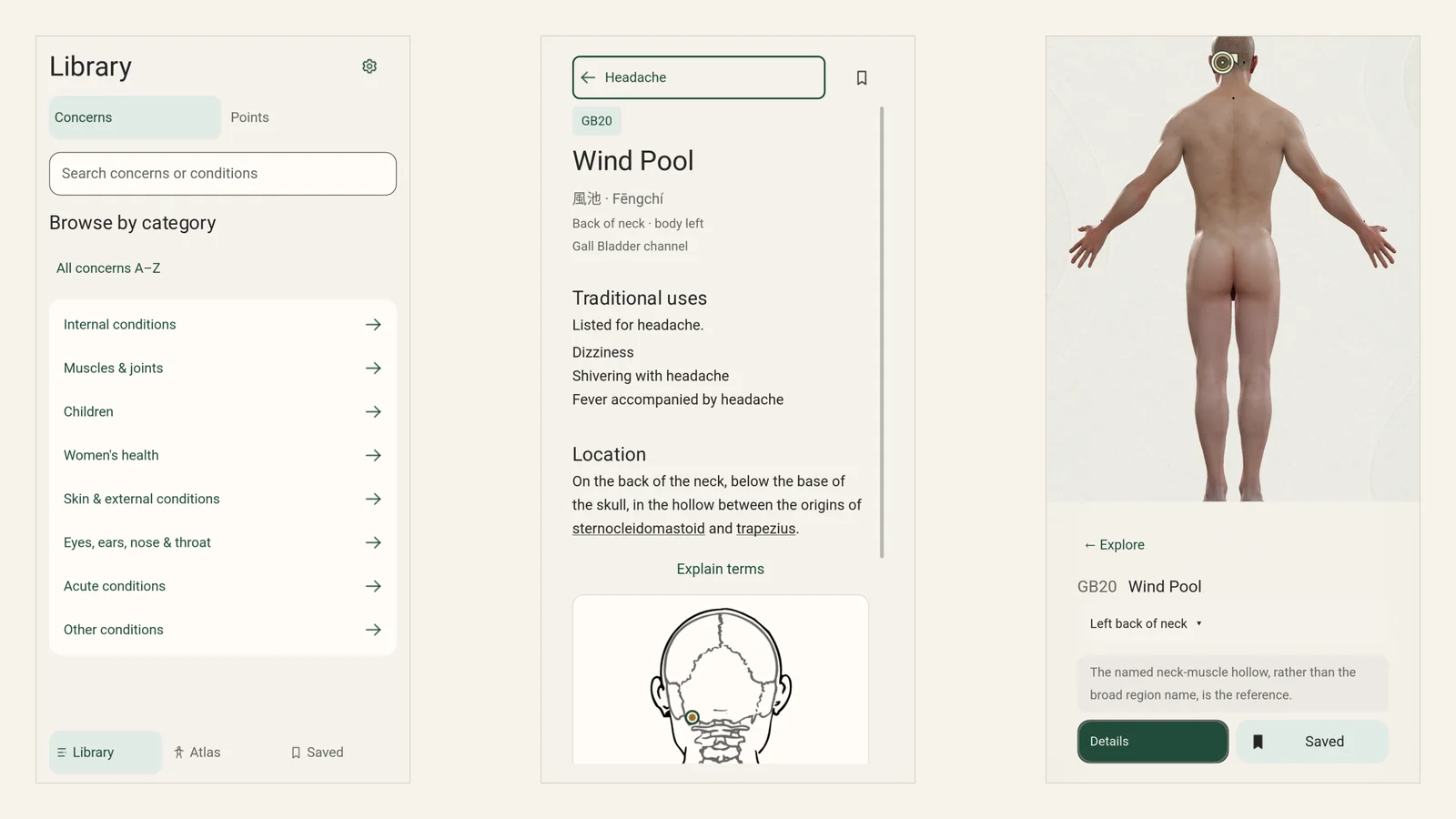
Moxa Atlas is an offline Android reference I am building for people who want to look up traditional moxibustion points by what interests them, rather than by point code. It connects a library of concerns and conditions to a 3D body, so you can read about each point, find it on the body and save it.
The traditional uses it lists are reference material, not treatment advice or a claim that anything works.
The walkthrough
One example from start to finish: Headache → GB20 · Wind Pool.
- Start with a concern. Search for Headache.
- Find its reference points. Open Headache and choose GB20.
- Understand each point. Read its traditional uses and location, then enlarge the location diagram.
- See where it is. Show it on the body, which turns and zooms to the back of the neck.
- Keep it for later. Save it, then reopen it from Saved.
The video is 21 seconds long and has no sound. Every frame is from the real app, driven through its own controls in an isolated test session. It was recorded on version 0.26.5 using the desktop renderer at phone-sized UI, so it shows the flow, not how the app performs on a phone.
Reduced motion is on, so the video is hidden here. The steps above describe what it shows.
The problem
Point references usually start from a point code. Someone who begins with a concern, such as headache, has to know where to look before they can find anything. And once they find a point, its description is only useful if they can also see where it sits on the body.
Design decisions
Start from the concern
The Library is the first screen. Concerns and conditions come first, and each one leads to its main reference points, so the route runs from a concern to a point and not the other way round.
Explain before locating
Each point opens with its traditional uses, its location in words and a location diagram you can enlarge. Reading comes first. Showing the point on the body is the next step.
Show the point on a real body
Each point can be shown on a 3D model of the body. The anatomy is not drawn or generated for the app, and the body turns to the side the point is on.
Keep Saved separate
Saved holds the concerns and points you choose to keep. It stays apart from the topic markers on the body, so removing a highlight never loses what you saved.
Current status
Moxa Atlas is a private Android build without a store listing. The APK is available on request. Wider testing on phones, with assistive technology and by qualified reviewers is still to do.
Related projects
Flow Temple is a moxa learning platform for beginners that sits next to this work. Moxa Point Finder was an earlier conversational experiment. Moxa Atlas is a separate, offline reference.